Attracting an Audience with Search Engine Optimization (SEO)
Last updated
August 25, 2021
Massive is always looking for interesting and compelling science stories. The author's number one priority is to write that interesting story. But, these stories don't exist in a vacuum. It's the responsibility of the outlet and and the author to attract readers to the piece. This article discusses a few ways that a little forethought can attract bigger audiences, without pandering, clickbait, or compromising content.
Scheduling an article
- This is the #1 way to increase visibility for an article: does your story have a news peg? For instance, if your story is about climate change and you know in a few weeks the UN will release a major climate report, the two will naturally go together.
- This isn't always possible. But, if there are holidays or events that an article can be tied to (even made-up social media holidays can work), this can also increase search engine results.
- Luckily, you don't need to nail things super precisely. For instance, on March 7th, there was a Google Doodle celebrating Olga Ladyzhenskaya, a Russian mathematician. On April 5th, the Google Doodle was of Hedwig Kohn, a physicist. Massive doesn't have an article on either of them, but the Science Heroes theme is similar and we do have an article on Lise Meitner, a contemporary of both. Here's a graph of our search impressions (the number of times Massive appears on someone's search results) around that time, see if you can pick out March 7th and April 5th.

- On the other hand, if you do specifically tailor publication date of a Massive article to a news event, you can do well even for more niche searches. For instance, Farah Qaiser's STEM discrimination piece covered embargoed research and went up as the embargo lifted. It beat out perpetual Massive favorite Mae Jemison (discussed below) in impressions and is still on the first Google page for "STEM discrimination" and other related searches (actually twice if you count Salon's syndication of the piece, which you should).
Descriptive text
- Having a cool article won't do much good if people can't find it. Use keywords in every possible space to essentially label the article as something relevant to a search result.
- Headlines - headlines should be specific and describe using keywords what the article is about. This is good for both search engines and for readers!
- example of a bad headline: "The Green New Deal, scaled to states, cities, and neighborhoods."
- Why is this bad? It contains only one specific keyword ("Green New Deal"), and otherwise uses very common words that won't pick up eyeballs or crawlers. Also it's unclear what the article is even about anyway.
- example of a better headline: "While Congress does nothing, New York City passed its own climate legislation"
- "Congress", "New York City", and "climate legislation" are all more searchable terms, though "climate legislation" could probably have been replaced with "Green New Deal".
- example of a bad headline: "The Green New Deal, scaled to states, cities, and neighborhoods."
- any keywords that don't get into the headline should go into the body of the article. Yes, it's okay to edit text for SEO. Keywords can go into the dek, they will be picked up by Google, but they're not highlighted in search results (it won't be in bold text for a user in search results)
- Always fill out image descriptions when uploading to TakeShape. Not only is this good for accessibility, but they're read by crawlers as well. Again, these will increase their search rankings even though they won't be seen by most users.
Some free tools you can use
- Trends is basically a one-stop-shop for learning about what people use Google search for, when they are searching, and what specific terms they're using. You can do all kinds of cool things like narrow down by location, time, season, or do comparisons between terms. There are lots and lots of other SEO tools on the web -- some free and some not -- but Trends is the easiest, most intuitive, and most informative. And it's free.
- Here's an example of using Trends to optimize an article. On May 2nd, 2019, Massive published an article on Maria Margaretha Winkelmann-Kirch. Winkelmann is a maiden name. Her name can be formatted with or without the hyphen, without "Winkelmann," without "Margaretha" (her middle name), or without both, as simply Maria Kirch (or even Kirchin, the grammatically female German version of her name, as I understand it). I wasn't sure which would be most easily found, so I used Trends to figure out how best to refer to her.
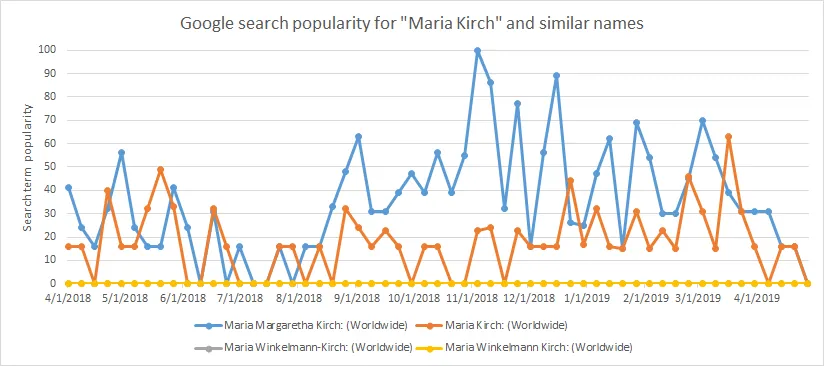
(y-axis is a ranking of how popular a search term is, with 100 being maximum popularity for that term)
- So, "Maria Winkelmann-Kirch" and "Maria Winkelmann Kirch" essentially do not get searched. There were editorial reasons to refer to her as "Maria Winkelmann Kirch," so that's how she's referred to for most of the text. But, in the headline, in captions, image descriptions, or any other place I could fit either "Maria Margaretha Kirch" or just "Maria Kirch," I did that.